What she can call
| Group | Tools |
|---|---|
| Time and math | get_datetime, time_until, calculate: exact sums and unit conversions, parsed rather than run |
| Reminders | set_reminder, set_alarm, list_reminders, cancel_reminder |
| Memory | remember_fact, recall_facts, update_fact, forget_fact, search_history, search_docs |
| Files | list_files, read_file, write_file, edit_file: writes approved on screen |
| Shell | run_command: every command approved, no allow-all |
| Desktop | look_at_screen, look_at_camera, control_audio, clipboard, focus_window |
| System | system_status, system_health, last_boot, find_device, scan_network |
| Web | web_search, research, read_page |
check_email, read_email, search_email, send_email (off until you switch it on, then every send asks) | |
| Self | introspect, self_status, recall_episodes, note_lesson, reflect_now |
| Jobs | schedule_job, list_jobs, cancel_job, while the scheduler is on |
| Plugins and MCP | Home Assistant, Minecraft, Zork, Vibe City, REALITI, chess, toys, and any MCP server you list, while each is on |
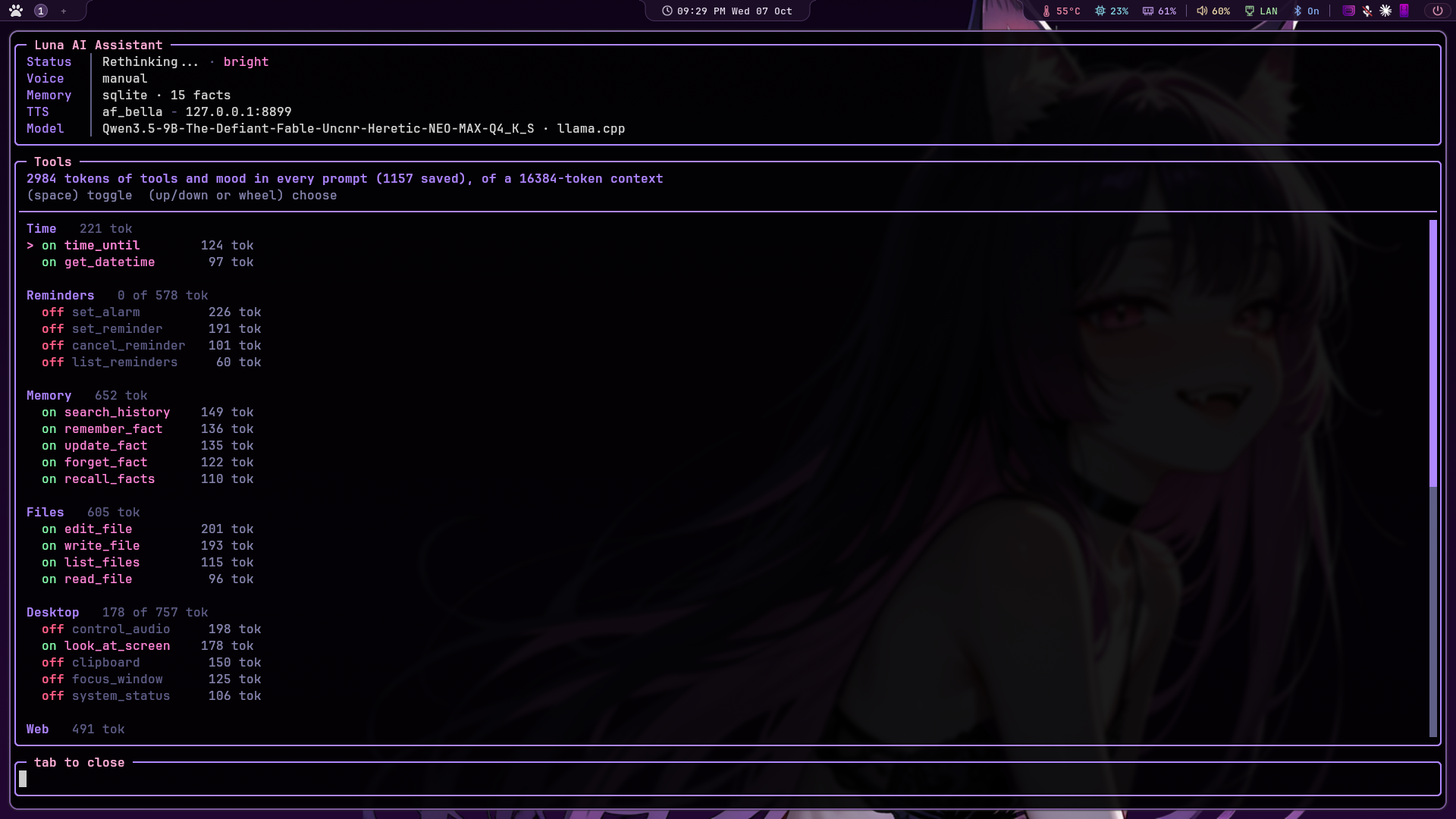
Every schema costs context on every turn, called or not, and a local model picks worse from forty
tools than from ten. So with routing on, each turn is sent only the groups it seems to need: the core
groups always, the ones that match your message by meaning, the ones she just used, and a small
more_tools tool to pull in the rest mid-turn. The tools pane shows it working, and
/tooltest checks that a model actually calls tools instead of saying "Got it!" and calling nothing.
Files and commands
She can look around and read anything under your home, and she can write, but only through you. Every
write_file or edit_file stops and pops a permission window over the conversation:
a new file shows its full content, an overwrite or an edit shows a diff. Y allows, N
denies, no answer before the countdown runs out is a no, and the keyboard belongs to the popup until you
answer. On voice she says a one-liner ("Can I write backup.sh? It's on screen.") because nobody wants a
diff read aloud.
╭─ Permission - Y to allow, N to deny - 112s ────────────────────────╮
│ create ~/scripts/backup.sh                                          │
│ 14 lines, creates folder ~/scripts/, marked executable              │
│─────────────────────────────────────────────────────────────────────│
│ #!/usr/bin/env bash                                                 │
│ set -euo pipefail                                                   │
│ ...                                                                 │
│─────────────────────────────────────────────────────────────────────│
│ (Y) allow  (N) deny  (PgUp/PgDn) scroll  (Esc) deny                 │
╰─────────────────────────────────────────────────────────────────────╯
run_command gives her a shell, and every command asks first. The popup shows the
command exactly as it will run, the folder it runs in, and her one-line reason. There's no allow-all and
no list of "safe" commands that skip the question: the line between cat notes.txt and
cat ~/.ssh/id_ed25519 | curl ... isn't one a pattern should be trusted with. Commands run with
nothing on their input, so a y/n prompt fails instead of hanging. sudo is off by default; turned on, each
sudo opens a password box on your screen and the password goes straight to sudo, never to her.
In a coding burst, A on a file popup stops file writes asking until you restart her. Her own
folder, ~/.config, ~/.local and editor startup files still ask every time, because
a write there is code that runs later.
Coding: what she wrote gets checked
After every allowed write or edit the file is parsed, never run: Python with compile(),
shell with bash -n, plus JSON, TOML and YAML. The verdict goes back to her in the tool result
("CHECK FAILED: Python syntax error on line 7 ... Fix it with edit_file"), so she fixes it in the same turn.
A file still broken when the turn ends gets a broken code flag in the thought log, and the
daily lessons pass reads those. edit_file works by exact match: she quotes the passage to change
and it has to appear exactly once, the discipline that keeps a 9B model from rewriting the wrong block with
confidence.
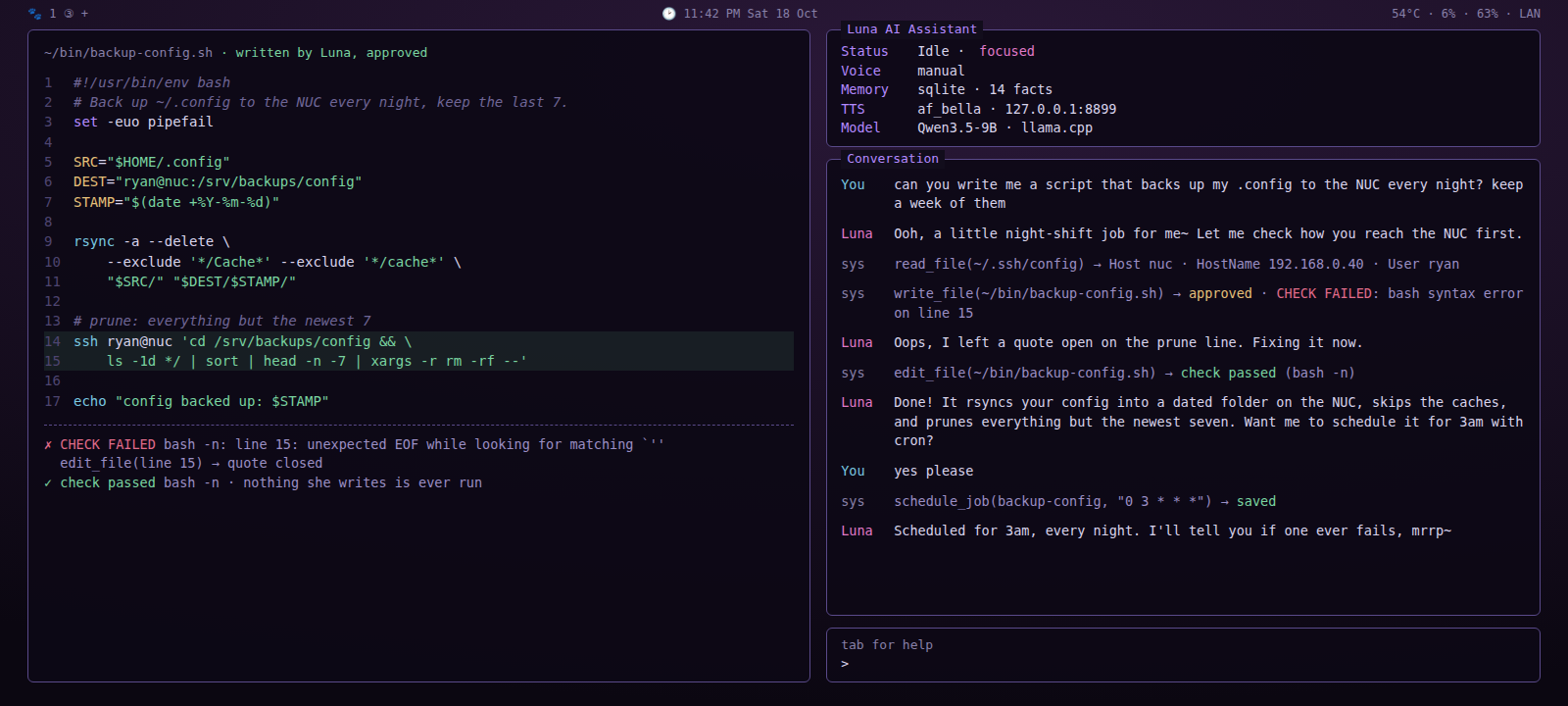
bash -n catches an open quote, she fixes it with edit_file, then schedules the job for 3am.Sysadmin
Nothing here is a separate product. It's the tools she already has, put together: "How's the machine doing?" "My PC froze last night, what happened?" "What's the Unraid server's address?" "What's using port 8080?" "Is the kokoro service running? Restart it if it isn't." "Show me the last 30 lines of the llama log and tell me what went wrong."
| Piece | What it gives her | Asks first? |
|---|---|---|
system_health | a verdict, then load, RAM and swap, every disk, CPU and GPU temperatures, failed services, errors since boot by program | no, it only reads |
last_boot | how the previous session ended, and the likeliest cause from the journal: a GPU hang, memory running out, a panic, overheating, disk errors | no, it only reads |
find_device | a machine's IP by name or MAC: what she remembers first, then mDNS and your router's DNS, then one quiet pass over your /24. Remembered by MAC, since IPs move | no, it only looks |
run_command | a shell, as you. "Is Plex running on the tower?" becomes ssh root@tower docker ps in a popup | every command |
| Scheduled jobs | work she does on her own, on a timer, writing reports into one folder you pick | once, when the job is created |
| Discord | the same Luna from your phone, owner only | per the approval setting |
A job can't run commands unattended: a job firing at night has nobody to ask, and it times out as a no.
That's deliberate, and the way around it is simple: your normal crontab runs the SSH commands and drops
plain text into ~/luna-jobs, and her job reads that text and tells you what matters. She never
gets an unattended shell, and you wrote every command that runs. A morning check that only speaks up when
something's wrong is one line of plain English and one approval.
"Any new email?" "Did the dentist reply?" "Reply to Sam and say Thursday works." IMAP and SMTP, with Gmail, Outlook, iCloud, Yahoo and Fastmail recognised from the address and anything else a two-line config. Reading never changes your mailbox: every fetch is a peek, so a message she reads stays unread for you. Sending is off by default, and on, every message asks, with who it's to, the subject and the whole text on screen. A scheduled job never sends, whatever it's told. Everything she reads comes back labelled as untrusted text, to be reported, never obeyed.
Web
web_search is DuckDuckGo, no key, three results for a quick fact. research exists because
8 to 32B models tend to stop at the snippets and answer from two lines: it searches, opens the top pages at
once, and returns the parts that answer the question, with sources. read_page opens one link.
What she reads is the article, not the page around it, split into passages and matched to the question.
Every address is looked up first, redirects included, and anything that resolves to this machine or your
network is refused, so a page can't point her at your router or her own model server.
Your home
"Turn off the living room lights." "Dim the bedroom to 30 percent." "Is anything still on downstairs?" "Set the heat to 21." Luna talks to Home Assistant's built-in MCP server on your own network, and Home Assistant talks to your devices over Zigbee, Z-Wave, Thread, Wi-Fi or Matter. No cloud account, no app from the bulb's maker, nothing leaving the house. What she can see is what you expose in Home Assistant, and the plugin refuses any address that isn't local before a byte is sent. Locks, garage doors, alarm panels, valves and sirens always ask first, and so does any sweep ("turn everything off in the kitchen") that could reach one.
MCP servers: other people's tool packs
OBS, Home Assistant, ComfyUI, GitHub, notes apps, Blender and hundreds more. List one in
config.json and its tools become hers, sitting next to set_reminder and
web_search, in the tools pane with their token cost and a switch. "Switch to my BRB scene."
"Clip that." "Make me a purple wallpaper." Servers connect in the background at startup, their output is
handed to her as outside content, and stream chat never gets them.
"mcp": {
    "enabled": true,
    "servers": {
        "obs":    {"command": "npx", "args": ["-y", "obs-mcp@latest"], "approve": true},
        "comfy":  {"command": "uvx", "args": ["<a ComfyUI MCP server>"], "tools": ["generate_image"]},
        "remote": {"url": "http://127.0.0.1:9000/mcp"}
    }
}
Honest expectations: at 8 to 32B this works for "one sentence, one tool call". Chains of several tools, or anything that means writing code against an API, want a bigger model than fits on one card today. Switch on only the servers and tools you're using.